
Context Menu
The context menu (right-click menu) provides quick access to context-sensitive actions. In ElyOS, context menus are available in multiple places, each offering options appropriate to the context.
Using the Context Menu
Section titled “Using the Context Menu”- Right-click on the desired area or element
- The context-appropriate menu appears
- Select an option from the menu
- Or click elsewhere to close the menu
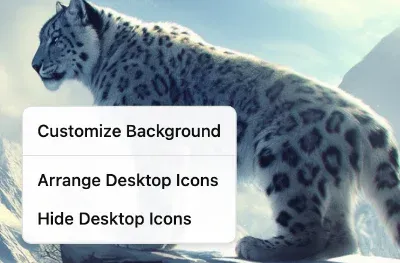 Context menu on the desktop with right-click
Desktop Context Menu
Section titled “Desktop Context Menu”Right-clicking on an empty area of the desktop provides the following options:
- Customize background: Opens the Settings application at background settings
- Arrange desktop icons: Automatically arranges shortcuts in a grid
- Hide/Show desktop icons: Hides or shows all desktop shortcuts
Desktop Shortcut Context Menu
Section titled “Desktop Shortcut Context Menu”Right-clicking on a desktop shortcut provides the following options:
- Open: Launches the application
- Rename: Renames the shortcut label
- Delete: Deletes the shortcut from the desktop (the application is not deleted)
Taskbar Context Menu
Section titled “Taskbar Context Menu”Right-clicking on an empty area of the taskbar:
- Customize taskbar: Opens the Settings application at taskbar settings
Start Menu Button Context Menu
Section titled “Start Menu Button Context Menu”Right-clicking on the Start Menu button:
- Customize Start Menu: Opens the Settings application at Start Menu settings
Related Topics
Section titled “Related Topics”- Desktop Shortcuts - Managing shortcuts
- Taskbar - Taskbar functions
- Start Menu - Using the Start Menu
- Settings - System customization